
NetherNet common issues
NetherNet (a WebRTC-based transport layer) establishes a connection in two phases:
- Signaling (
TCPHTTP/HTTPS orUDP 7551LAN): the client and server exchange SDP offers and answers, cryptographic identity assertions (a=identity), and ICE network candidates. - Peer connection (
UDPWebRTC): the client and server run ICE connectivity checks (STUN/TURN), establish a DTLS encrypted session, and open two SCTP DataChannels (ReliableDataChannelandUnreliableDataChannel).
Because signaling and game traffic travel over different protocols and ports, misconfigurations in NAT, firewalls, or candidate gathering can cause connection failures even when the server appears online in the server list.
1:1 NAT and unreachable private IPs (cloud VMs, Docker, home routers)
Symptom
- The server appears online in the Minecraft server list because
GET /v1/joinover TCP succeeds. - When attempting to join, the client hangs on “Locating server” or “Connecting to external server” and eventually fails.
- In debug logs (
debug.level: 2), you may seeNegotiation for <id> failed: Peer did not open both data channelsorPeer connection entered state FAILED.
Why it happens
During WebRTC negotiation, ext-webrtc (libdatachannel) inspects the operating system’s local network interfaces to gather host ICE candidates.
- On cloud VMs (AWS EC2, Oracle Cloud, Google Cloud, Azure), the network adapter is assigned a private VPC IP (
10.0.0.xor172.31.x.x), and the cloud provider maps a public IP to it through a 1:1 NAT. - In Docker containers (default bridge mode) or behind home routers, the server only sees its container or LAN IP (
172.17.0.xor192.168.1.x). - On hosts with virtual interfaces (Docker bridges, VPNs like WireGuard or Tailscale, virtualization bridges), the server gathers all those internal addresses as
hostcandidates.
Without advertise-addresses, the server writes these private IP addresses into the SDP answer sent to the client. Players on the public internet then send WebRTC UDP packets to 10.x.x.x or 172.17.x.x, which are unroutable.
How to fix it
Configure transport.nethernet.advertise-addresses in pocketmine.yml with your server’s public WAN IP addresses:
transport:
  nethernet:
    ice-udp-mux: true
    port-range: [19132, 19132]
    advertise-addresses:
      - 203.0.113.10 # Replace with your server's public IPv4 (and/or IPv6)
When advertise-addresses is set:
- Any locally gathered
hostcandidate whose IP is not inadvertise-addressesis stripped from the SDP answer, so internal, Docker, and VPN IPs are not sent to clients. - For each IP listed in
advertise-addressesthat was not locally bound on an interface, NetherNet synthesizes a server-reflexive (typ srflx) ICE candidate using the bound UDP port of the first locally gathered UDP host candidate of the same IP family (IPv4orIPv6).
1:1 UDP port forwarding required (no port translation)
Because advertise-addresses announces the local UDP port that Axolotl-PM bound to, your router, firewall, or Docker container must forward the UDP port 1:1 without port translation (PAT). For example, if Axolotl-PM binds to UDP port 19132, external UDP port 19132 must map to internal UDP port 19132 (-p 19132:19132/udp in Docker). Mapping external 25000/udp to internal 19132/udp will not work.
“No local candidates to answer with” (no candidates to resolve)
Symptom
Players cannot join over HTTP signaling, and with debug logging enabled (debug.level: 2), the console logs:
[NetherNet thread/DEBUG]: [HTTP signaling] Refused an offer: No local candidates to answer withOr during negotiation:
[NetherNet thread/DEBUG]: Negotiation for <networkId> failed: No local candidates to answer withWhy it happens
For HTTP signaling, NetherNet uses bundled ICE (CandidateMode::BUNDLED), where the HTTP response must contain at least one usable ICE candidate in the SDP answer. This error occurs when candidate gathering finishes with zero candidates remaining after filtering:
- When
ice-udp-muxisfalse, every active player connection and ongoing negotiation binds its own dedicated UDP socket fromport-range. Ifport-range: [19132, 19135]is configured, only 4 UDP ports are available. When a 5th player tries to join,libdatachannelcannot bind a UDP port in that range and gathers 0 candidates. - All ports in
port-rangeare already occupied by another process, such as whenport-range: [19132, 19132]is set while RakNet or Dedicated Query is already bound to UDP port19132on the same IP. - To synthesize a server-reflexive (
srflx) candidate for an IP inadvertise-addresses, NetherNet needs a local UDPhostcandidate of the same address family (IPv4vsIPv6) to know which UDP port to advertise. If your server only has IPv4 interfaces (orserver-ipis set to an IPv4 address), butadvertise-addressesonly contains an IPv6 address (or vice versa), all IPv4 host candidates are dropped because they are not inadvertise-addresses, and the IPv6 address cannot be advertised because no IPv6 UDP port was gathered. - NetherNet passes
server-ip(when not0.0.0.0) as the bind address toext-webrtc.libjuicethen gathers only that one address, instead of every interface. Ifserver-ipis not an address of this machine, the UDP socket cannot be created and the connection fails.
How to fix it
- Enable
ice-udp-mux: truewithport-range: [19132, 19132]so all players share a single UDP socket, or makeport-rangelarge enough to cover your maximum player count plus simultaneous join negotiations. - If
transport.nameincludes bothnethernet,raknet, RakNet occupies UDP19132(server-port). Do not include19132intransport.nethernet.port-rangewhile RakNet or Dedicated Query is using UDP19132; use a separate UDP port or range such as[19134, 19134]for NetherNet, or disable RakNet (transport.name: nethernetandenable-query: falseif sharing the port). - Make sure
advertise-addressesincludes an IPv4 address when your server binds to IPv4, and leaveserver-ip=0.0.0.0inserver.propertiesunless you need to bind to a specific network interface.
Client candidates ignored or rejected (mDNS / .local / non-IP candidates)
Symptom
In debug logs, you see:
Offer from <networkId> carries X ICE candidates that are malformed or do not name an IP address, skipping themor:
Peer sent a candidate that is malformed or does not name an IP addressWhy it happens
IceCandidate::isAcceptableFromPeer() requires every peer ICE candidate to contain a literal IPv4 or IPv6 address (FILTER_VALIDATE_IP). Candidates containing hostnames or .local mDNS addresses are stripped before they reach libdatachannel.
For HTTP signaling (TransportNegotiator::addSignalingPeerCandidate()), NetherNet also injects a synthetic srflx remote candidate (foundation: signaling) from the source IP of the HTTP request, using the port of the client’s first UDP host candidate, unless the offer already contains that IP.
How to fix it
- Because NetherNet uses the HTTP client’s IP as a fallback ICE candidate for players behind NAT, having all HTTP requests arrive from
127.0.0.1(your reverse proxy) withoutreverse-proxy.enabled: truecauses NetherNet to try127.0.0.1as the client’s candidate instead of the player’s public IP. Configuretransport.nethernet.builtin-signaling.reverse-proxywhenever HTTP signaling sits behind a proxy. - If a custom client or signaling bridge sends only hostname candidates, resolve hostnames to IP literals before submitting the SDP offer, and include at least one UDP host candidate.
“Timed out gathering ICE candidates” (15-second join delay or failure)
Symptom
- Joining the server takes up to 15 seconds or fails with:text
Negotiation for <networkId> failed: Timed out gathering ICE candidates - Even on LAN or direct connections, players experience a long pause before connecting.
Why it happens
- Over HTTP signaling, NetherNet waits until
PeerConnection::getGatheringState() === GatheringState::COMPLETEbefore building and returning the bundled SDP answer (DEFAULT_GATHERING_TIMEOUT = 15.0seconds). If you configure a STUN or TURN server intransport.nethernet.ice-serversthat drops UDP packets or is blocked by an outbound firewall, gathering may not complete until the STUN requests time out. If that exceeds 15 seconds, the negotiation fails withTimed out gathering ICE candidates.
How to fix it
- If your server has a dedicated public IP or a port-forwarded 1:1 NAT, do not configure STUN or TURN servers in
ice-servers. Useadvertise-addressesinstead so candidate gathering completes immediately using local sockets. - If you use STUN or TURN, verify that outbound UDP/TCP port
3478/5349is open and all entries inice-serversare reachable from the server machine.
“Peer did not open both data channels” (5-second timeout after answer)
Symptom
- The HTTP
/v1/join/<networkId>POST request succeeds (200 OK), meaning the client received the SDP answer. - 5 seconds later, the server logs:text
Negotiation for <networkId> failed: Peer did not open both data channels
Why it happens
Once the server sends the SDP answer, a 5-second timer (DEFAULT_CHANNEL_TIMEOUT = 5.0) starts for the client to complete ICE connectivity checks, finish the DTLS handshake, and open both the ReliableDataChannel and UnreliableDataChannel SCTP streams.
This timeout happens in two main situations:
- The client received your HTTP signaling response over TCP, but its UDP WebRTC packets never reached your server (or your server’s UDP responses never reached the client).
- On plain HTTP signaling, the TOFU (Trust On First Use) confirmation dialog appears on the player’s screen after HTTP signaling succeeds. Because the client does not create its DataChannels until the player clicks accept or decline, waiting on that dialog for more than 5 seconds causes the initial negotiation to time out on the server.
Checklist to fix it
- If the player was prompted with the TOFU trust dialog on their first join over plain HTTP, have them accept the prompt and reconnect (or configure HTTPS signaling to avoid the prompt).
- Verify that the UDP ports in
transport.nethernet.port-rangeare open in both your OS firewall (ufw,iptables, Windows Firewall) and your cloud provider’s security group or network ACL. - If
port-rangeis empty andice-udp-muxisfalse, the OS picks random ephemeral UDP ports (32768-60999), which firewalls block by default. Setice-udp-mux: trueandport-range: [19132, 19132](or an explicit range like[19132, 19200]). - Check
pocketmine.ymlto verify thatadvertise-addressescontains your public IP, not a private IP (10.x.x.x,192.168.x.x,172.16.x.x-172.31.x.x). - If ICE succeeds but the DTLS/SCTP handshake stalls due to packet fragmentation (on VPNs, PPPoE, or mobile data), lower
transport.nethernet.mtufrom1200to1000or900.
“TURN servers cannot be used with ICE UDP mux”
Symptom
On startup, Axolotl-PM fails to start NetherNet with:
Invalid NetherNet settings in pocketmine.yml: ice-servers entry X is a TURN server, which cannot be used while ice-udp-mux is enabledor ext-webrtc throws WebRtcException: TURN servers cannot be used with ICE UDP mux.
Why it happens
libdatachannel’s single-socket UDP multiplexer (enableIceUdpMux) only multiplexes direct STUN/ICE/DTLS traffic on the local UDP port and cannot allocate or demultiplex TURN relay channels over the muxed socket.
How to fix it
- If you use a TURN server in
transport.nethernet.ice-servers, setice-udp-mux: falseand configure a multi-portport-range(for example,port-range: [19132, 19200]). - If you do not need TURN relaying, remove the
type: turnentry fromice-serversand keepice-udp-mux: true.
TLS, reverse proxy, and trust warning (TOFU) pitfalls
1. “Client initiated a TLS handshake on a plaintext endpoint”
A client or reverse proxy connected using https:// to Axolotl-PM’s built-in signaling server while transport.nethernet.builtin-signaling.tls had no certificate and key configured. Configure tls.certificate and tls.key in pocketmine.yml, or if you terminate TLS at a reverse proxy (Nginx or Caddy), configure the proxy to forward to Axolotl-PM over plain http://127.0.0.1:<port>.
2. Players see a “Trust this server” (TOFU) warning every time or after server migration
When connecting over plain HTTP, Minecraft Bedrock uses TOFU (Trust On First Use) and pins the public key derived from nethernet.key (transport.nethernet.key-file). If nethernet.key is deleted, regenerated, or not copied when migrating hosts, returning players are prompted again because the server’s cryptographic identity changed.
- Back up and preserve
nethernet.keyin your server data directory. - To avoid the TOFU prompt for all players, serve HTTP signaling over HTTPS with a certificate signed by a trusted certificate authority (such as Let’s Encrypt).
3. “No client address in the … header” / all players share 127.0.0.1
When reverse-proxy.enabled: true is set, NetherNet checks if the TCP connection comes from reverse-proxy.trusted-ips. If it does, it reads the header configured in reverse-proxy.header (X-Forwarded-For, X-Real-IP, CF-Connecting-IP). For X-Forwarded-For, it parses the comma-separated list from right to left, skipping any IP in trusted-ips to find the first untrusted client IP.
- List your reverse proxy in
trusted-ips(such as127.0.0.1or your Docker proxy subnet). - Configure your reverse proxy to set the header named in
reverse-proxy.header, or joins are refused withNo client address in the <header> header. The RFC 7239Forwardedheader is not supported. - If a player or attacker triggers rate limiting (
Blocking <ip>: too many connections being negotiated at once, default 16 concurrent negotiations per IP) whilereverse-proxyis not enabled behind a proxy,127.0.0.1is blocked for 300 seconds, locking out all players through that proxy.
Identity and clock skew issues (“Identity rejected”)
Symptom
Players are refused during signaling with:
[HTTP signaling] Refused an offer: Identity rejected: Token has expiredor Token is not valid yet, Token was issued in the future, or Offer has no identity assertion.
Why it happens
- Every NetherNet SDP offer and answer carries an
a=identityattribute containing a JSON Web Token (JWT) signed withES384(P-384) and bound to the connection’s DTLS certificate fingerprint. - NetherNet validates the token’s
nbf(Not Before),iat(Issued At), andexp(Expiration) timestamps against the server’s system clock with a 60-second leeway (JsonWebToken::DEFAULT_LEEWAY_SECONDS = 60). Self-signed tokens have a lifetime of 60 seconds. - If your server’s system clock or the client’s device clock is off by more than 60 seconds, token validation fails.
- If
xbox-auth=oninserver.properties, anonymous offers (offers without ana=identityassertion) are rejected.
How to fix it
- Enable NTP time synchronization (
systemd-timesyncd,chrony, or Windows Time) on your server host. - Ask the affected player to enable automatic date and time synchronization on their device.
Diagnosing client disconnect codes (DisconnectFailReason)
When the Minecraft client fails to connect to a server, it shows a disconnect screen with a codeword and a “Show details” button:
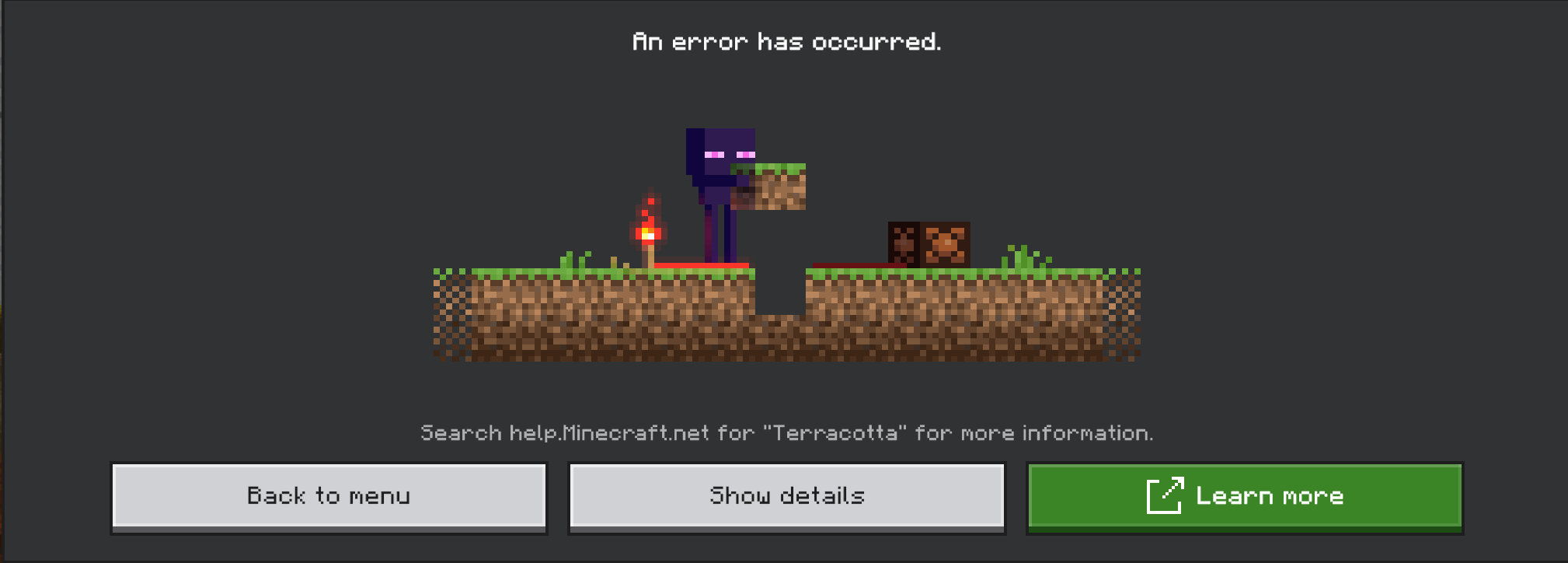
Clicking “Show details” opens a diagnostic view where the first detail line ends in <stage>-<number> (for example, Error Detail InitialConnection-149, circled in red below):
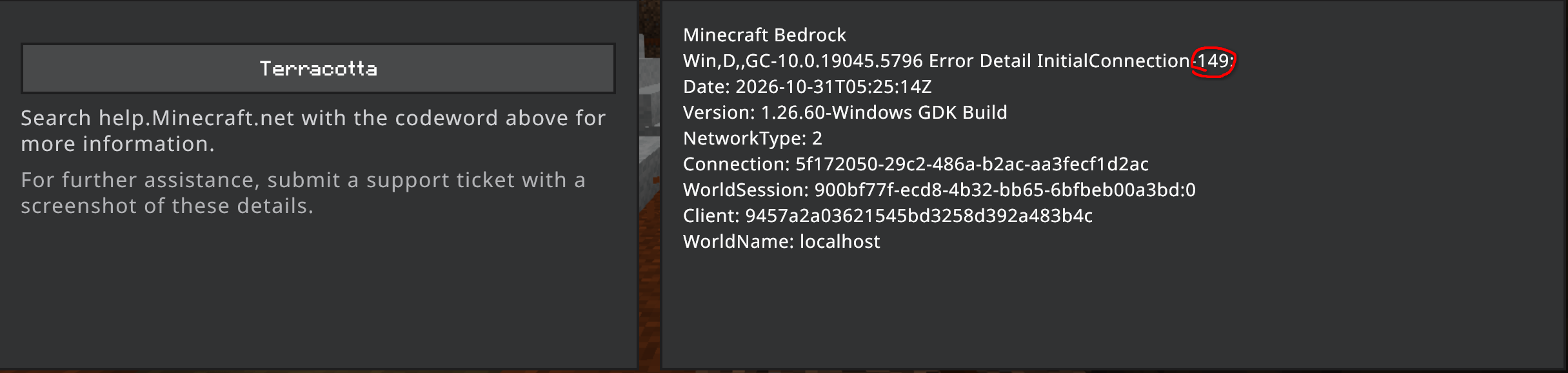
That number is the DisconnectFailReason ordinal from Mojang’s DisconnectFailReason.json (see also CloudburstMC’s client disconnect reasons table). The codes below are the ones most commonly encountered with NetherNet:
| Code | DisconnectFailReason | Codeword | Meaning | What to check |
|---|---|---|---|---|
83 | NetherNetICE | Door | None of the provided ICE candidates could be reached. | Set port-range (or ice-udp-mux: true with a single port), open and forward those UDP ports 1:1 in your firewall and router, and set advertise-addresses to your public IP if behind a 1:1 NAT or Docker (details). |
149 | UnsupportedTransport | Terracotta | HTTP POST /v1/join failed. | Verify that the TCP signaling port (server-port or builtin-signaling.port) is open, check your reverse proxy and TLS settings, and check the server console with debug.level: 2 for [HTTP signaling] Refused an offer (details). |