
NetherNet Usage
What is NetherNet?
NetherNet is a modern, WebRTC-based transport protocol that replaces the legacy RakNet implementation in Minecraft: Bedrock Edition. RakNet has been deprecated and is completely removed as of 1.26.60 (v26.60).
Why NetherNet over RakNet?
RakNet is an abandoned networking library originally developed by Jenkins Software and later archived by Facebook (Meta). It has received no mainstream updates for years, requiring Mojang to internally maintain and patch security vulnerabilities.
By adopting WebRTC standards (ICE, DTLS, SCTP Data Channels), NetherNet modernizes Bedrock’s transport layer.
Here are a few highlights comparing NetherNet to legacy RakNet:
| Feature / Aspect | NetherNet (WebRTC) | Legacy RakNet |
|---|---|---|
| Transport Encryption | Standardized transport-level encryption via DTLS | Custom application-layer encryption (AES-CFB8/GCM over ECDH) |
| P2P & Topology | Native P2P support via WebRTC Data Channels | Client-Server centric in Bedrock (RakNet’s internal peer features were largely omitted or deprecated) |
| NAT Traversal | Industry-standard STUN / TURN / ICE protocol stack | Fragile legacy UDP hole punching without standardized TURN relay fallback |
| Traffic Routing & Signaling | Connection setup uses HTTP(S) signaling, easily integrated with standard reverse proxies and L7 load balancers | Direct raw UDP binding; requires dedicated UDP routing or expensive specialized L4 DDoS/proxy services |
| Modern Stack & Maintenance | Actively supported open standards with rich cross-platform ecosystem | Unmaintained third-party C++ library with Mojang-specific internal forks |
Migrating from old RakNet to NetherNet in Axolotl-PM
Axolotl-PM includes a first-party NetherNet implementation.
NetherNet requires the axolotl-pm/ext-webrtc PHP extension. If it is missing or its version is unsupported, NetherNet is skipped with a warning and the server keeps running on the remaining transports.
In pocketmine.yml, you will now see a new section called transport.
Enabling nethernet in transport.name will set up an HTTP server listening on a port defined in server.properties.
By default, Axolotl-PM does not use TLS certificates. Setting up TLS is encouraged due to how clients trust servers via HTTP/HTTPS:
- When your signaling server uses HTTPS (with a valid certificate issued by trusted certificate authorities like Let’s Encrypt), the client uses TLS as its trust anchor. It connects silently and does not prompt players with any confirmation dialogs.
- When your signaling server uses plain HTTP, TOFU (Trust On First Use) will be the trust anchor. When a client establishes a connection for the first time, it prompts players with a dialog asking whether they trust this server. Once accepted, the client pins the server’s identity key.
Use a Reverse Proxy with TLS
Using TLS with a reverse proxy is strongly encouraged. Axolotl-PM implemented its built-in HTTP server by hand to keep the phar size small and avoid adding unnecessary dependencies. While it works well, we recommend putting it behind a reverse proxy like Nginx or Caddy for production servers.
Configuration reference (pocketmine.yml)
You can find all transport and NetherNet settings under the transport section in pocketmine.yml:
transport:
  #Network transport(s) used for player connections. Accepts a comma-separated list (e.g. raknet,nethernet).
  #Built-in options: raknet, nethernet. Plugins may register additional transports.
  name: nethernet
  #Settings for the NetherNet (WebRTC) transport.
  nethernet:
    #Path to the persistent identity key, relative to the data directory.
    #Clients trust this key upon their first join.
    #Changing this file will prompt players to re-verify on their next connection.
    key-file: nethernet.key

    #Operator domain or server name included in identity assertions sent to clients.
    #Leave empty to use the server MOTD (with formatting codes stripped).
    #Clients pin the public key rather than this name, so changing it does not require players to re-verify.
    identity-domain:

    #Enables ICE UDP multiplexing so connections share a single UDP socket.
    #Only uses a fixed port if port-range specifies a single port; otherwise, an arbitrary port is assigned.
    #NOTE: Cannot be used with TURN servers.
    ice-udp-mux: false

    #UDP port range for connections.
    #Parsed as [min, max], e.g. [19132, 19140]. Leave empty to use any available port.
    port-range:

    #Maximum size in bytes of IP packets sent to clients. Not negotiated, so only raise it if every client's network path allows it.
    mtu: 1200

    #IP addresses advertised to clients for peer connections instead of locally gathered interface addresses.
    #Useful when behind a 1:1 NAT (specify the public IP) or when the server has unreachable internal interfaces.
    #Addresses are announced using the local bound port; 1:1 port forwarding without port translation is required.
    #Only affects HTTP signaling; LAN discovery always advertises local addresses. Leave empty to advertise all gathered addresses.
    advertise-addresses:
    #Example:
    #- 203.0.113.10

    #STUN/TURN ICE servers for NAT traversal and relay.
    #Unreachable servers will delay connection establishment until candidate gathering times out.
    ice-servers:
      #port defaults to 3478 if omitted.
      #Example:
      #- type: stun
      #  host: stun.example.com
      #  port: 3478
      #- type: turn
      #  host: turn.example.com
      #  port: 3478
      #  username: <username for the TURN server>
      #  password: <password for the TURN server>

    #Built-in signaling channels: HTTP signaling endpoint (GET/POST /v1/join) and LAN broadcast discovery.
    builtin-signaling:
      #Disable if signaling is handled externally (e.g. by a custom signaling plugin using NetherNetInterface::acceptOffer()).
      #If disabled without an alternative signaling mechanism, clients cannot connect.
      enabled: true

      #TCP port for HTTP signaling. Set to 0 to use server-port from server.properties.
      #Only modify this when behind a reverse proxy that forwards signaling traffic to a custom port.
      port: 0

      #TLS encryption for the HTTP signaling endpoint. Plain HTTP requests are redirected to HTTPS.
      #Leave certificate and key empty to serve plain HTTP only. Paths are relative to the data directory.
      tls:
        #Path to PEM certificate or certificate chain file.
        certificate:
        #Path to PEM private key file.
        key:
        #Optional private key passphrase, or file:<path> to read from a file.
        passphrase:

      #Enable when HTTP signaling is behind a reverse proxy (e.g. nginx, Caddy, Cloudflare).
      #Allows resolving the client's real IP from forwarded headers for features like TURN relays.
      reverse-proxy:
        enabled: false
        #Header the proxy sets the client's IP in (e.g. X-Forwarded-For, X-Real-IP, CF-Connecting-IP).
        header: X-Forwarded-For
        #List of trusted reverse proxy IP addresses or CIDR blocks.
        #Forwarded headers from unlisted addresses are ignored to prevent IP address spoofing.
        #At least one entry is required when enabled.
        trusted-ips:
        #Example:
        #- 127.0.0.1
        #- 10.0.0.2
Explaining the settings
transport.name
Controls which network transports are active. Accepts a comma-separated list of transport names:
nethernet: The modern WebRTC transport.- Plugins can also register additional transports, allowing you to run multiple transports simultaneously (e.g.
nethernet,custom_transport).
transport.nethernet.key-file
The path to the identity key file, relative to your server data folder (defaults to nethernet.key). It is generated on first start if it doesn’t exist. Clients pin this key on their first connection, whether or not signaling uses TLS.
Do not lose your key file
If you delete or replace nethernet.key, all returning players will see a trust warning again when they reconnect. Make sure to back up this file when moving servers!
transport.nethernet.identity-domain
The domain or server name sent in identity assertions to clients. If you leave this empty, Axolotl-PM automatically uses your server MOTD (with formatting codes removed). Because clients pin the key and not this name, changing this setting won’t trigger re-verification dialogs.
transport.nethernet.ice-udp-mux
Enables ICE UDP multiplexing so that all incoming client connections share a single UDP socket rather than opening separate sockets for each player.
- If
port-rangespecifies a single port (such as[19132, 19132]), all player connections bind to that single UDP port. This is very convenient because you only need to forward/allow that one UDP port in your firewall! - If
port-rangespecifies a wider range, all connections still share one port, but it is picked from inside that range and changes on every restart. - If
port-rangeis empty, the shared port is assigned by the OS and also changes on every restart. The server logs a warning when this happens.
Note
ice-udp-mux cannot be used if you configure TURN servers.
transport.nethernet.port-range
Specifies the range of UDP ports Axolotl-PM can use for WebRTC game traffic, for example [19132, 19140].
Important: UDP Ports & Firewall Warning
By default, port-range is empty and ice-udp-mux is false. In this default state, Axolotl-PM requests an arbitrary available UDP port from the OS for each incoming player session.
Unless you either:
- Configure a fixed
port-range(e.g.[19132, 19140]) and open those specific ports, or - Enable
ice-udp-mux: truewith a single port inport-range(e.g.[19132, 19132])
you would have to open your operating system’s entire ephemeral UDP port range (commonly 32768-60999 on Linux) in your firewall and router, otherwise player connections will get blocked by your firewall as soon as the game traffic starts!
With ice-udp-mux off, one port is used per connected player, so a port-range also caps how many players can be online at once. A range of [19132, 19140] allows 9. Once it runs out, further joins fail with “Failed to gather local ICE candidates”.
transport.nethernet.mtu
The maximum size in bytes of IP packets sent to clients (default 1200, allowed range 620-4144). This is not negotiated: every client gets the same value. Only raise it if every client’s network path allows it.
transport.nethernet.advertise-addresses
The IP addresses announced to clients for WebRTC connections instead of locally detected network adapter IPs.
- When you need this: If your server is hosted behind a 1:1 NAT (like AWS EC2, Google Cloud, Oracle Cloud, or behind a home router), your server only sees its internal private IP (e.g.
10.0.0.xor192.168.1.x). Set your public IP here so clients on the internet know where to send WebRTC traffic. - Requires 1:1 port forwarding without port translation.
- Only affects HTTP signaling. Local LAN discovery always broadcasts local addresses.
transport.nethernet.ice-servers
A list of STUN and TURN servers for NAT traversal:
stun: Helps clients and servers discover their public IP and port to establish direct peer connections through NAT. You can use free public STUN servers (likestun.cloudflare.com:3478).turn: Relays game traffic when direct UDP hole punching fails (e.g. for players on restrictive mobile data or behind symmetric corporate/university firewalls). Because TURN relays all traffic, it requires bandwidth and authentication (usernameandpassword).
Make sure ICE servers are reachable
If an ICE server listed here silently drops packets, candidate gathering stalls. When gathering doesn’t finish within the 15-second timeout, the join fails with “Timed out gathering ICE candidates” instead of eventually connecting. An ICE server whose hostname doesn’t resolve fails fast and is harmless.
transport.nethernet.builtin-signaling
Settings for the built-in HTTP signaling server:
enabled: Keeps the built-in HTTP signaling server and LAN discovery active. Leave this astrueunless you use a custom plugin that handles signaling externally. The endpoints areGET /v1/join(a capability probe, which also acceptsHEAD) andPOST /v1/join/{networkId}withContent-Type: application/sdp(the SDP exchange).port: The TCP port for HTTP signaling. Setting this to0uses theserver-portfromserver.properties(usually19132). Only change this if you are using a reverse proxy that forwards traffic to a custom internal port.tls:certificate: Path to a PEM certificate or certificate chain file.key: Path to the PEM private key file.passphrase: Optional passphrase for the private key, orfile:<path>to read it from a file.- When TLS is configured, HTTP requests are automatically redirected to HTTPS.
reverse-proxy:enabled: Enable this if your signaling server sits behind a reverse proxy (Nginx, Caddy, Cloudflare, etc.).header: The header your proxy writes the player’s IP to (defaults toX-Forwarded-For). Common values areX-Forwarded-For,X-Real-IPandCF-Connecting-IP. Only this header is read, every other one is ignored. The standardForwardedheader is not supported.trusted-ips: List of trusted proxy IP addresses or CIDR blocks (e.g.127.0.0.1,10.0.0.2). At least one entry is required whenenabledistrue. The header is ignored when the request comes from an unlisted IP, to prevent players from spoofing their IP.
List only your proxies in trusted-ips
Joins from a trusted IP are refused unless they carry the configured header, so players can’t connect directly from a listed address.
Advanced setup
Depending on how and where you host your server, here are the most common setup recipes:
Setup 1: Production setup with a reverse proxy and HTTPS (Recommended, Example)
This is the recommended setup for public production servers. A reverse proxy like Nginx or Caddy handles HTTPS certificate renewal automatically and protects the signaling endpoint.
In this setup:
- The reverse proxy listens on TCP port
19132(or443) with HTTPS and forwards signaling requests to Axolotl-PM on a local port (e.g.8080). - Game traffic connects directly to Axolotl-PM via UDP on the ports configured in
port-range.
1. Configure pocketmine.yml:
transport:
  name: nethernet
  nethernet:
    port-range: [19132, 19140]
    builtin-signaling:
      enabled: true
      port: 8080 # Internal TCP port for reverse proxy
      reverse-proxy:
        enabled: true
        header: X-Forwarded-For
        trusted-ips:
          - 127.0.0.1
2. Configure your reverse proxy:
server {
    listen 19132 ssl http2;
    server_name play.example.com;

    ssl_certificate /etc/letsencrypt/live/play.example.com/fullchain.pem;
    ssl_certificate_key /etc/letsencrypt/live/play.example.com/privkey.pem;

    location / {
        proxy_pass http://127.0.0.1:8080;
        proxy_set_header Host $host;
        proxy_set_header X-Real-IP $remote_addr;
        proxy_set_header X-Forwarded-For $proxy_add_x_forwarded_for;
        proxy_set_header X-Forwarded-Proto $scheme;

        proxy_buffering off;
        proxy_read_timeout 60s;
    }
}
3. Firewall settings:
- Allow TCP port
19132to your reverse proxy. - Allow UDP ports
19132-19140to Axolotl-PM.
Setup 2: Direct built-in TLS
If you don’t want to run an external reverse proxy, you can provide your certificate and key files directly to Axolotl-PM:
transport:
  name: nethernet
  nethernet:
    port-range: [19132, 19140]
    builtin-signaling:
      enabled: true
      port: 0 # Uses server-port from server.properties
      tls:
        certificate: "certificates/fullchain.pem"
        key: "certificates/privkey.pem"
        passphrase: ""
Setup 3: Home hosting or simple VPS (Plain HTTP)
If you’re hosting at home or for a small group of friends without TLS certificates:
- Configure
pocketmine.yml:yamltransport: name: nethernet nethernet: port-range: [19132, 19135] advertise-addresses: - "203.0.113.50" # Your public WAN IP - Forward the following ports in your router:
- TCP port
19132(for HTTP signaling) - UDP ports
19132-19135(for WebRTC game connections)
- TCP port
- When players join, they will see a one-time trust dialog asking them to confirm the server. Once accepted, they can play normally.
Setup 4: NAT traversal with STUN & TURN relays
If some players (especially on mobile carriers with CGNAT or strict firewalls) cannot connect directly:
transport:
  name: nethernet
  nethernet:
    ice-servers:
      - type: stun
        host: stun.cloudflare.com
        port: 3478
      - type: turn
        host: turn.example.com
        port: 3478
        username: "user"
        password: "password"
STUN vs TURN
Public STUN servers (like Cloudflare or Google) are free to use. However, TURN servers relay all gameplay traffic and consume server bandwidth, so you will usually need to run your own TURN server (such as Coturn) or use a paid service.
Warning
Using STUN and TURN servers is discouraged since the client always does full trickle ICE. The connection will be delayed until all candidates are resolved.
Setup 5: Running multiple transports (e.g. plugin-registered transports)
Axolotl-PM supports running multiple network transports simultaneously. In addition to the built-in NetherNet transport, plugins can register their own custom transports (such as custom protocol bridges or alternative network layers).
You can enable multiple transports by specifying a comma-separated list under transport.name:
transport:
  # Accepts a comma-separated list of transports (built-in and plugin transports)
  name: nethernet,custom_transport
Port management with multiple transports
Each transport manages its own sockets and listeners independently. Make sure any additional transports registered by plugins do not try to bind to the same ports used by NetherNet (such as the TCP signaling port or the UDP ports in port-range).
Ports you need to open
Unlike legacy RakNet, which only used UDP 19132, NetherNet uses both TCP (for HTTP signaling) and UDP (for WebRTC game data):
| Protocol | Port(s) | Traffic Type | Notes |
|---|---|---|---|
| TCP | 19132 (or your reverse proxy port) | HTTP / HTTPS Signaling | Forward to reverse proxy or Axolotl-PM |
| UDP | OS ephemeral range, OR port-range, OR single port if ice-udp-mux is enabled | WebRTC Game Traffic | Forward directly to Axolotl-PM (see warning below) |
| UDP | 7551 | LAN Discovery | For discovering servers on local WiFi/LAN. Not configurable |
| UDP/TCP | 3478 / 5349 | STUN / TURN | Outbound connection to configured ICE servers |
Do not leave UDP ports unconfigured in your firewall!
By default (port-range is empty and ice-udp-mux is false), Axolotl-PM dynamically binds to an arbitrary UDP port assigned by the operating system for each connection. This means your firewall will block incoming player sessions unless the entire ephemeral UDP port range is open.
To avoid opening that whole range:
- Option A (Recommended): Set
port-range(e.g.[19132, 19140]) and open only those specific UDP ports (19132-19140/udp). Size the range to the number of players you expect, since one port is used per connected player. - Option B: Set
ice-udp-mux: trueandport-range: [19132, 19132]so all WebRTC traffic shares a single UDP port (19132/udp). Note that this cannot be used with TURN servers.
Troubleshooting
Players get an “Trust this server” dialog
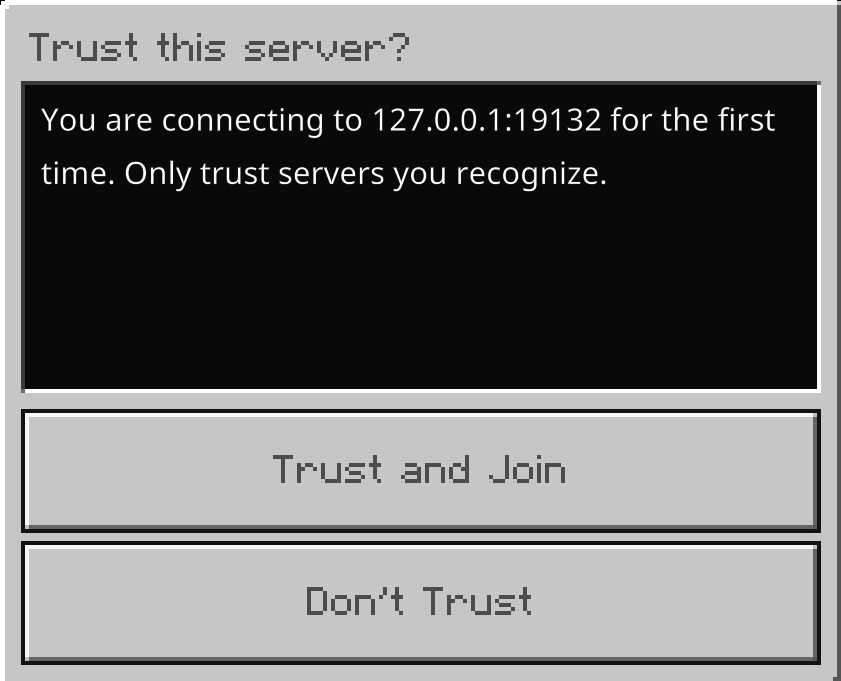
- This is expected behavior on plain HTTP under TOFU (Trust On First Use).
- To avoid the dialog completely, set up HTTPS with a valid certificate from a trusted authority (see Setup 1).
- Make sure
nethernet.keyhas not been deleted or modified.
Players can connect to signaling, but get stuck on “Locating Server”
- This usually means the HTTP signaling handshake succeeded, but the WebRTC UDP game connection couldn’t reach your server.
- Check that the UDP ports configured in
port-rangeare open in your firewall and forwarded in your router. - If your server is behind NAT (AWS, GCP, Oracle Cloud, home router), make sure you configured
advertise-addresseswith your public IP. - Check that any STUN/TURN servers configured under
ice-serversare online and reachable.
All player IPs show as 127.0.0.1
- If you are using a reverse proxy, make sure
reverse-proxy.enabledistrueand your proxy’s IP (e.g.127.0.0.1) is inreverse-proxy.trusted-ips.
Players can’t join and the console shows “Refused an offer from trusted proxy”
- The request came from an IP in
reverse-proxy.trusted-ipswithout the header named inreverse-proxy.header. Make sure your proxy sets that exact header. - If players connect directly from that address instead of through the proxy, remove it from
trusted-ips.
Connection takes a long time before joining, or fails after about 15 seconds
- If you have unreachable STUN or TURN servers in
ice-servers, candidate gathering stalls and the join fails once the gathering timeout is reached. Try temporarily removing them to check if connections improve.